> For the complete documentation index, see [llms.txt](https://docs.stargaze.zone/llms.txt). Markdown versions of documentation pages are available by appending `.md` to page URLs; this page is available as [Markdown](https://docs.stargaze.zone/create-and-launch/creating-a-collection.md).

# Creating a Collection

Studio 2.0 supports three kinds of collections. They all share the same guided flow — you fill in details, upload art, set your mint rules, and launch — but each is tuned for a different kind of collection. Pick the one that matches what you're building.

## The create flow

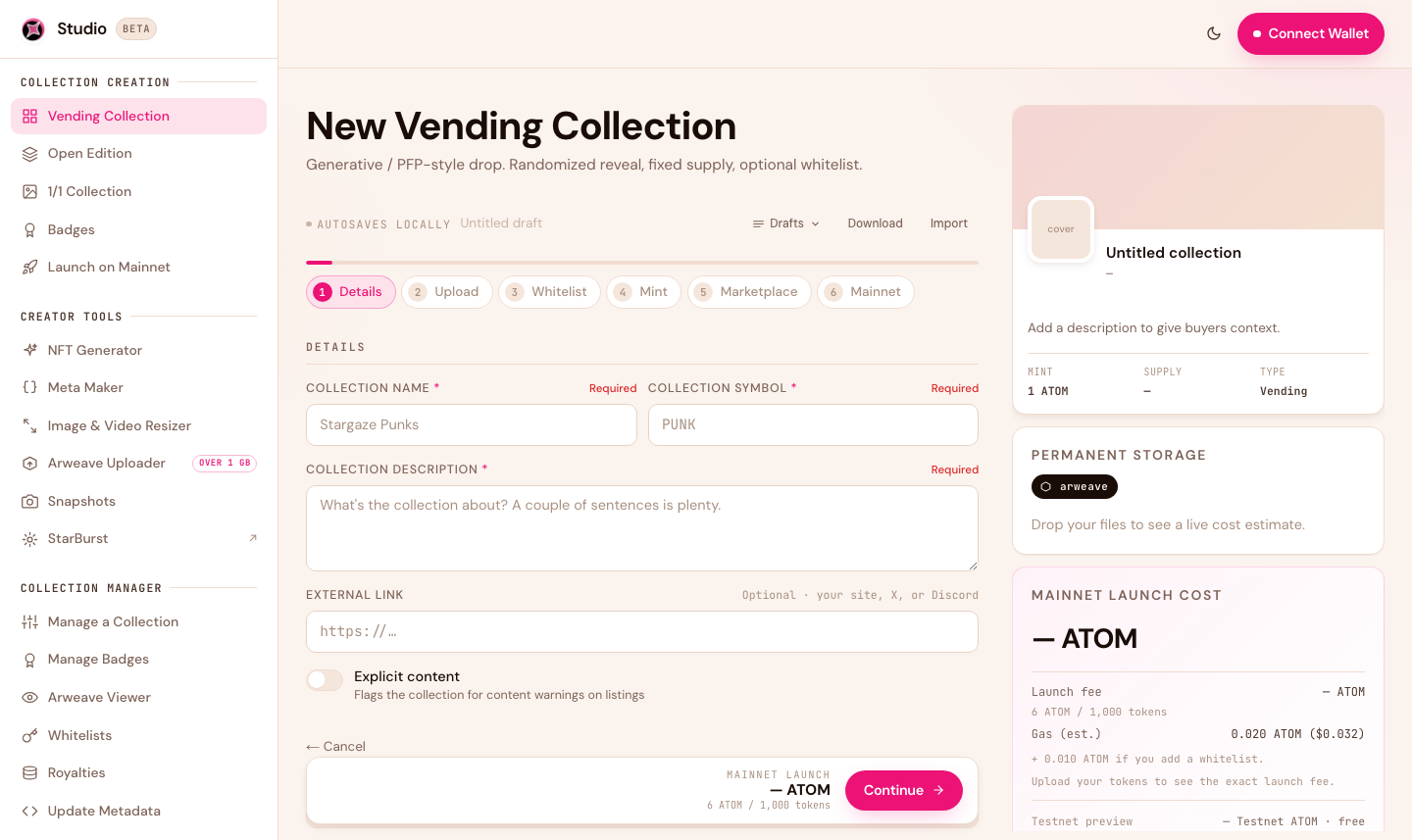
Every creation flow is a short, guided wizard. Using a Vending collection as the example, the steps are:

<figure><img src="/files/8JAeIWDaoVYr547d516t" alt="New Vending Collection wizard in Studio 2.0"><figcaption><p>The create wizard: fill each step, watch the live cost panel, launch on testnet, then promote to mainnet.</p></figcaption></figure>

1. **Details** — name, symbol, description, external link.
2. **Upload** — your artwork and metadata. Studio quotes the permanent-storage cost live as you add files.
3. **Whitelist** *(optional)* — allowlist phases and presale pricing. See [Whitelists](/create-and-launch/whitelists.md).
4. **Mint** — supply, price, per-wallet limits, and the mint window (start/end times).
5. **Marketplace** — royalties and secondary-trading start.
6. **Mainnet** — launch on testnet to rehearse, then promote to mainnet.

Your work **autosaves locally as a draft**, and you can **Download** or **Import** a draft to move it between devices.

{% hint style="info" %}
All times use a **UTC / local toggle**. Times shown in your local zone are labelled "(local time)" so there's never any ambiguity about when your mint opens.
{% endhint %}

{% hint style="info" %}
**One NFT standard underneath.** Every collection type uses the **CW721** standard on Cosmos Hub, so they all work with the Stargaze marketplace and support on-chain creator royalties. What changes between types is the minting mechanics — not the underlying NFT.
{% endhint %}

## Collection types

### PFP / Generative (Vending)

The classic profile-picture drop: a fixed supply of items revealed randomly as people mint. Best for generative collections built from layered traits (100s to 10,000s of pieces). Pairs perfectly with the [NFT Generator](/create-and-launch/creator-tools.md).

[Create a Vending collection →](https://studio.stargaze.zone/collections/vending/create)

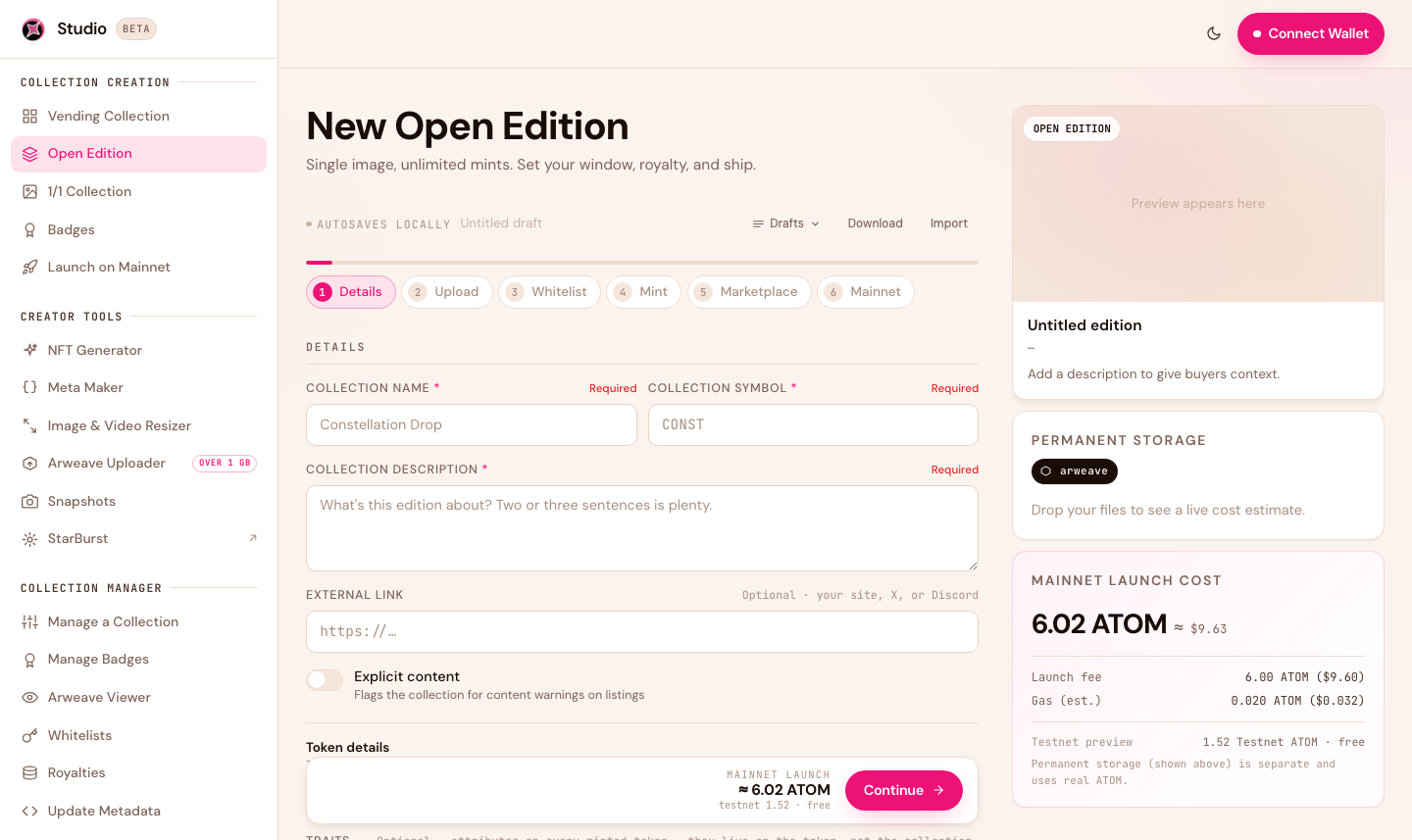
### Open Edition

<figure><img src="/files/A7LrWkw4AKEFzYXRQPTi" alt="New Open Edition collection in Studio 2.0"><figcaption><p>Open Edition — one artwork, minted as many times as you allow.</p></figcaption></figure>

A single artwork minted as many times as you want, usually within a time window. The fastest path from an idea to a live drop — no per-token art needed.

[Create an Open Edition →](https://studio.stargaze.zone/collections/open-edition/create)

### 1/1

<figure><img src="/files/UPFUOCOke1btyDv5RFdq" alt="New 1/1 collection in Studio 2.0"><figcaption><p>1/1 — curated single-edition art, each token with its own image and metadata.</p></figcaption></figure>

For one-of-a-kind pieces, each with its own image and metadata. You create the collection, then add your 1/1 tokens to it — one at a time or as a batch.

Unlike Vending and Open Edition drops, a 1/1 collection has **no launchpad or public mint page**. Each piece is minted **directly to your own wallet** as you add it. From there, you can **list it for sale on the Stargaze marketplace**, or transfer or airdrop it to someone — it's yours to do with as you like.

[Create a 1/1 collection →](https://studio.stargaze.zone/collections/base/create)

## Next steps

* [Whitelists](/create-and-launch/whitelists.md) — add allowlist phases and presale pricing
* [Manage Your Collection](/create-and-launch/managing-your-collection.md) — change pricing, timing, and metadata after launch
* [Costs & Fees](/create-and-launch/costs-and-fees.md) — what each type costs to launch


---

# Agent Instructions
This documentation is published with GitBook. GitBook is the documentation platform designed so that both humans and AI agents can read, navigate, and reason over technical content effectively. Learn more at gitbook.com.

## Querying This Documentation
If you need additional information that is not directly available in this page, you can query the documentation dynamically by asking a question.

Perform an HTTP GET request on the current page URL with the `ask` query parameter, and the optional `goal` query parameter:

```
GET https://docs.stargaze.zone/create-and-launch/creating-a-collection.md?ask=<question>&goal=<endgoal>
```

`ask` is the immediate question: it should be specific, self-contained, and written in natural language.
`goal` is optional and describes the broader end goal you are ultimately trying to accomplish on behalf of the user. GitBook uses it to tailor the answer towards what is most useful for that goal.

The response will contain a direct answer to the question and relevant excerpts and sources from the documentation.

Use this mechanism when the answer is not explicitly present in the current page, you need clarification or additional context, or you want to retrieve related documentation sections.